Requesting Non-Commercial Licenses
To continue using Dragonfly for non-commercial purposes after your trial version has expired, you will need to request and then activate a non-commercial license. Non-commercial licenses are granted free-of-charge to qualified researchers, academics, students, and non-commercial developers for non-profit research, academic, or development purposes. Non-commercial licenses are valid for a one-year period and can be renewed annually at no charge (see Non-Commercial Licensing Program on our website for details).
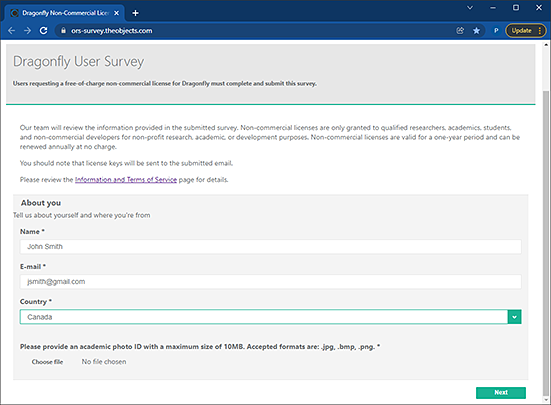
Choose Help > Request Non-Commercial License on the menu bar to open the Dragonfly User Survey webpage, shown below. You will need to enter your credentials and complete the survey to request a non-commercial license. You should note that license keys will be sent to the submitted email.
Dragonfly User Survey webpage
 How to Request a Non-Commercial License
- Do one of the following:
- Choose Help > Request Non-Commercial License on the menu bar.
- Click Request Non-Commercial License in the License Expired message box.
This message box will appear onscreen if your Dragonfly license has already expired and the application is locked.
The Dragonfly User Survey webpage appears.
- Click the Information and Terms of Service link to review the non-commercial licensing program requirements, recommended.
- Enter your credentials, attach a photo of the ID issued by your institution or organization, and then complete the survey.
- Submit your request.
Our team will review the information provided in the submitted survey. If approved, your requested license key will be sent to the submitted email. You will then need to activate your new license (see Activating Dragonfly).