Deep Learning Preferences
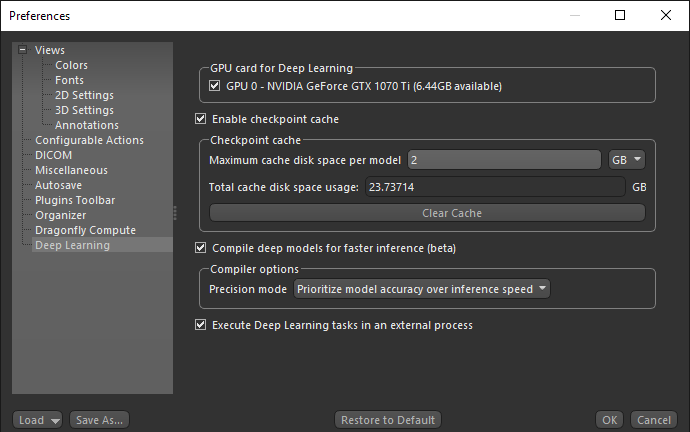
The Deep Learning preferences let you choose a number of settings for working with the Deep Learning tool and the Segmentation Wizard. Choose Deep Learning in the Preferences dialog to open the Deep Learning preferences, shown below.
Deep Learning preferences
| Item | Description |
|---|---|
| GPU card for Deep Learning |
Lets you choose a specific GPU card for Deep Learning.
Note A GPU card is not required, but if one is present it will be used. |
| Enable checkpoint cache |
Check this item to enable the checkpoint cache, which lets you load and then save a model at a selected checkpoint (see Saving and Loading Model Checkpoints).
Maximum cache disk space per model… Lets you set the per model limit for the cache disk space. You should select a per model disk space as per the type of model you usually train and the number of checkpoints you want to save. For example, each copy of a U-Net model with a depth level of 3 and an initial filter count of 64 takes approximately 15 MB, while each copy of a U-Net model with an input dimension of 3 slices, a depth level of 5, and an initial filter count of 64 takes approximately 250 MB. Total cache disk space usage… Indicates the total size of the checkpoint cache. If required, you can clear the checkpoint cache by clicking Clear Cache. Note Models will be saved at a checkpoint each time that it has a better score until the cache limit is reached. Afterwards, the model with the lowest score will be cleared so that the new checkpoint can be saved. |
| Compile deep models for faster inference |
If checked, deep models will be compiled for faster inference with TensorFlow-TensorRT (TF-TRT), a deep-learning compiler for TensorFlow that optimizes models for inference on NVIDIA devices. If not selected, deep models will be compiled with the default settings.
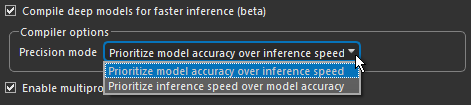
You should note that this option primarily increases inference efficiency for lower end GPUs. There is usually only limited benefits for optimizing inference for high-end GPUs. In addition, optimized inference usually works best for simple models, such as U-Net. It might not work well to compile more complex models, such as Sensor3D. As shown below, you can select from two precision modes to compile a deep model for inference — 'Prioritize inference speed over model accuracy' or 'Prioritize model accuracy over inference speed'.
This process includes five types of optimizations — precision calibration, layers and tensor fusion, kernel auto-tuning, dynamic tensor memory, and multiple stream execution. Inference efficiency can be a concern when deploying deep models on systems with limited GPUs because of latency, memory utilization, and power consumption. Note TF-TRT is the TensorFlow integration for NVIDIA’s TensorRT (TRT) High-Performance Deep-Learning Inference SDK. It focuses specifically on running an already-trained network quickly and efficiently on NVIDIA hardware. Refer to https://docs.nvidia.com/deeplearning/frameworks/tf-trt-user-guide/index.html for more information about TF-TRT. |
| Execute Deep Learning tasks in an external process |
If checked, TensorFlow functionality such as generating models, model training, and inference will run as an external process. The main benefit of this is that memory can be released for subsequent processes after training or inference is completed. In previous versions, memory used by TensorFlow could only be released by exiting Dragonfly.
Note Running TensorFlow functionality as an external process is only available for Windows installations. This option is disabled by default for Linux installations. |