Image Loader Interface
Dragonfly's Image Loader works like a wizard, in which a succession of screens — Import Image and Image Settings — are presented to help you navigate the process of importing image files. In addition, two optional dialogs — Preview and Crop the Image — are available to preview datasets and to select cropping settings. You should note that data can be imported from local and network drives or from storage devices such as CDs, DVDs, and USB keys (see Supported File Formats).
 Import Image
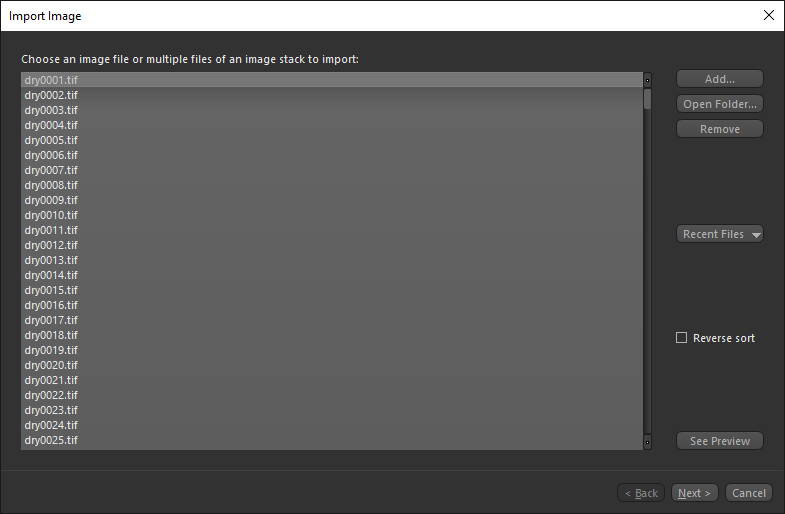
The first step of importing image files is to choose the files that you want to import. This task can be accomplished on the first screen, shown below.
Image Import screen
| Description | |
|---|---|
| Add |
Opens a standard Add File(s) dialog. Pre-defined file types are available to facilitate the file selection process, such as BMP, JPEG, PNG, RAW, TIFF, and others (see Supported File Formats).
|
| Open Folder | Opens the Current Folder dialog. In this case, all applicable files will be added to the Image Loader from the selected folder. |
| Remove | Removes selected files from the list. |
| Recent Files | Click this button to select from a list of recently imported files. |
| Reverse sort | If checked, items added to the dialog will be sorted in descending order. |
| See Preview | Click this button to preview the selected file in a Preview window (see Previewing Images). |
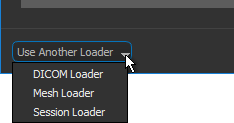
| Use Another Loader |
Lets you choose a different loader — the DICOM Loader, Mesh Loader, or Session Loader — to import data.
DICOM Loader… Opens the Manage DICOM Images dialog, in which you search for and open DICOM image files (see Using the DICOM Loader). Mesh Loader… Lets you choose a mesh to load (see Importing Meshes). Session Loader… Opens the Load Session File dialog, in which you can load a saved session file (see Loading Sessions). Note See Miscellaneous Preferences for information about selecting a default loader for application start. |
 Previewing Images
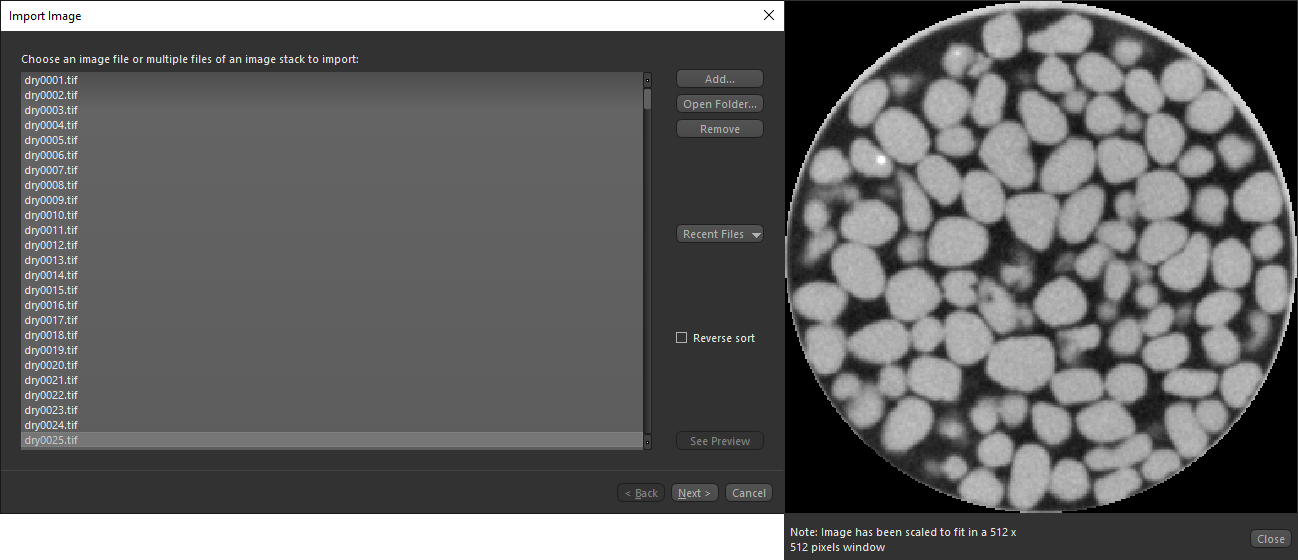
You can preview files before importing them.
This is the preview that is shown for most standard image files, such as TIFF. If the image being previewed is larger than the window, it will be scaled. Note that the original aspect ratio will be preserved when the image is scaled.
Standard image preview
Note Previews are not available for all data types. For example, raw data cannot be previewed as it does not provide the Image Loader with enough information to generate a preview. However, if you load the associated DAT file, you will be able to see a preview of the raw data.
In the Preview window that is shown when importing Dragonfly Object files (*.ORSObject extension) and DAT files, information about the composition of the associated raw data — such as its size in pixels, data type, and offset into file — is extracted and displayed for reference purposes.
Dragonfly Object and DAT file preview
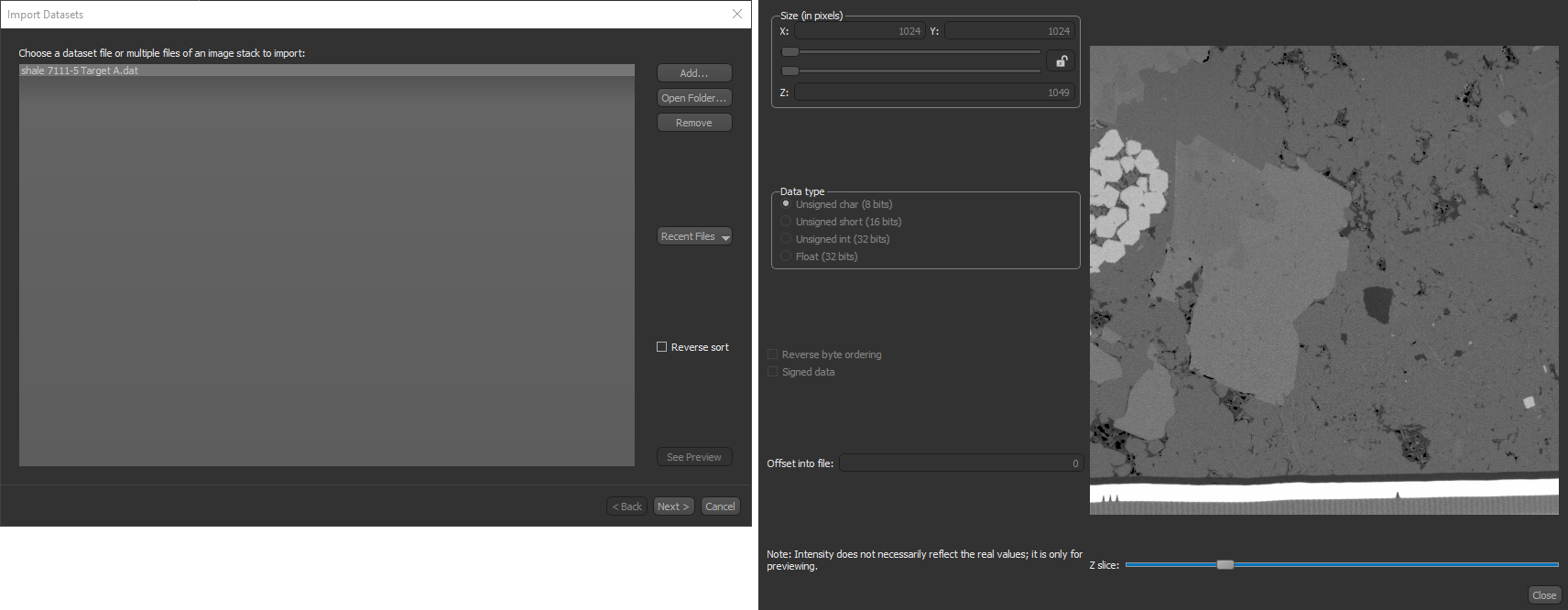
Image Settings
You can select settings for image sampling, data offset and slope, axis transformations, as well as crop an image during the import process. You can also choose to continue importing additional image files. These options are available on the Image Settings screen, shown below.
Image Settings screen
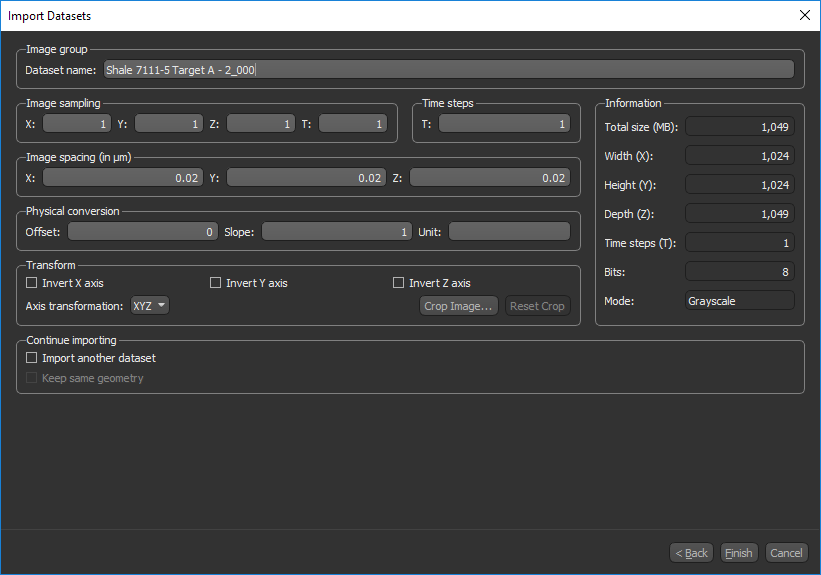
You can select the following image settings when you import datasets.
| Description | |
|---|---|
| Image group | You can enter a new name for the imported dataset here, if required. Implementing a naming convention is recommended if you typically work with multiple datasets at the same time. |
| Image sampling |
By default, the image sampling values are always set to '1'. If you choose to resample your image, you can do so by modifying the X-Y X, Y T… Determines the sampling rate for time volumes. |
| Time steps | By default, the number of time steps is set to '1'. If you are importing a dataset with a time dimension, you may need to manually enter the number of time steps in this edit box. If that information is present in the file being imported, the correct value will appear automatically in this field. You should note that the number of time steps must be a factor of the number of images in the dataset. |
| Image spacing | This number represents the absolute distance between slices of data. Some file formats, such as TIFF files and DAT files exported from Dragonfly contain this information, in which case the fields will automatically show the correct values. For other file formats, you may have to set these values accordingly. |
| Physical conversion |
Some file formats contain this information, in which case the fields will show the correct values. If not, you can select values for these fields as follows:
Offset*… Changes the default Offset value. Offset is a basic transfer function that controls the brightness of an image. The nominal value is 0. Slope*… Changes the default Slope value. Slope is a basic transfer function that controls the contrast of an image. The nominal value is 1. * See Image Properties Panel for more information about these parameters. |
| Transform |
Determines the sequence in which the dataset will be parsed. Data is typically structured inside a Cartesian coordinate system following the right-hand rule.
Invert X axis… If selected, all data along the X axis will be read from maximum to minimum values. Invert Y axis… If selected, all data along the Y axis will be read from maximum to minimum values. Invert intensity… If selected, all data values will be inverted. Axis transformation… Lets you choose which axis alignment will be displayed by default — X-Y-Z, X-Z-Y, Y-X-Z, Y-Z-X, Z-X-Y, Z-Y-X. Crop Image… Opens the Crop the Image dialog, in which you can select the portion of the image data that you want to load (see Cropping Image Data). Reset Crop… Discards the selected image cropping settings. |
| Information |
Displays a summary of the file that will be imported, including its size, dimensions, bit depth, and mode.
Total size… Indicates the total byte count, calculated as X*Y Width (X)… Indicates the number of pixels along the X-axis. Height (Y)… Indicates the number of pixels along the Y-axis. Depth (Z)… Indicates the number of pixels along the Z-axis. Time steps (T)… Indicates the number of time steps. Bits… Indicates the bit depth. Mode… Indicates the mode — either Grayscale or Color. |
| Continue importing |
Provides options for importing additional images.
Import another image… Check this option if you plan to import an additional image or images. Keep same geometry… Check this option if want the dimensions of the next dataset that is imported to be consistent with the current dataset. If required, datasets will be clipped to the dimensions of the current dataset or to the cropping that was applied to the original dataset. |
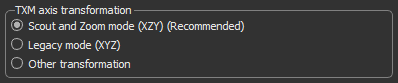
| TXM axis transformation |
Provides additional options for importing TXM files, as shown and described below.
Scout and Zoom mode (XYZ)… If selected, imports TXM files with an XYZ matrix encoding consistent with ZEISS Xradia stage coordinates. This is the recommended option for importing TXM files. Legacy Mode (XYZ)… If selected, imports TXM files with standard XYZ matrix decoding. This was the default behavior for all software releases prior to version 3.6. Other transformation… If selected, then a ZYX axis transformation will be applied. You should note that you can also make your adjustments in the Axis transformation drop-down menu in the Transform box that is available for all file formats. Note This option is available for Dragonfly 3D World ZEISS edition only. Contact Comet Technologies Canada Inc. for information about the availability of this version of Dragonfly. |
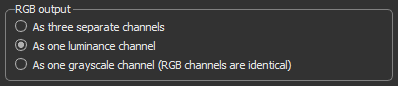
| RGB output |
Provides additional options for importing RGB images when the selected data contains color information, as shown and described below.
As three separate channels… If selected, all three channels — Red, Green, and Blue — will be loaded and each separate channel will be identified as to its originating channel in the Data Properties and Settings panel. For example, Blue Imported Data. As one luminance channel… If selected, the RGB image will be converted into a single-channel luminance representation. In Dragonfly, the conversion of an RGB image to a luminance channel is computed as follows: Luminance = 0.2126*R + 0.7152*B + 0.0722*G (refer to https://en.wikipedia.org/wiki/Grayscale for more information about luminance conversions). As one grayscale channel (RBG channels are identical)… If selected, one channel will be loaded. You should note that if the Image Loader determines that all three channels are not identical after the loading, a message box will appear. Note The above options are not available for RGBA images. For these images, all four channels — Alpha, Red, Green, and Blue — will be imported and added automatically to the Data Properties and Settings panel. Note You can export RGB channels in the BMP, JPEG, PNG, and TIFF file formats (see Exporting Images as RGB). |
 Configurable Actions for Importing Images
You can configure the following actions for importing image files in the Preferences dialog (see Configurable Actions for information about modifying a default action).
| Action | Key | Mouse |
|---|---|---|
| Import image files | Left Ctrl + I | - |
